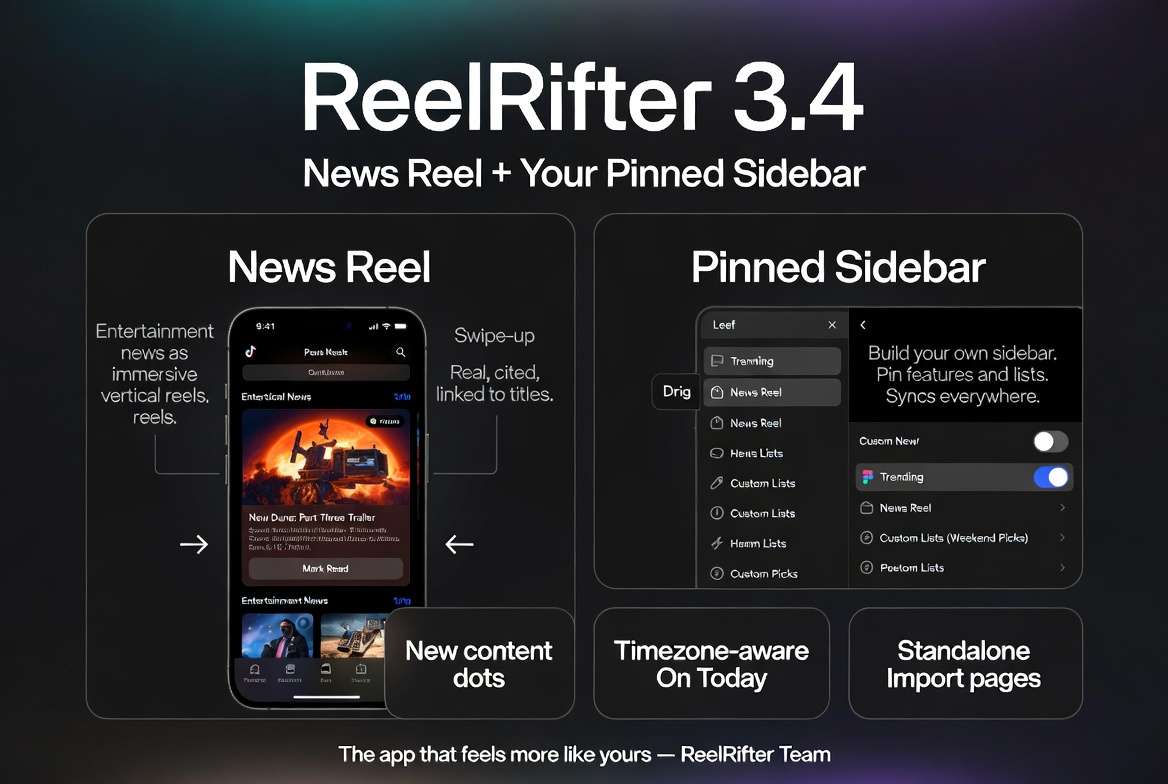
ReelRifter 3.4 is two marquee features and a pile of things that make the rest of the app feel more like yours. Here's what landed.
News Reel — the day's entertainment news, as a reel
There's a new top-level surface at /news: News Reel. It's the entertainment news of the day rendered as a full-screen, TikTok-style vertical feed — swipe up for the next story, tap to act.
What makes it different from a generic headline scroller:
- It's real, and it's cited. A daily job has Claude research the day's movie / TV / streaming / celebrity news with live web search, and every card carries a source. No made-up headlines, no stale training-data guesses — if a story can't be verified against a current article, it doesn't make the reel.
- Every story ties back to a title. Where a story is about a specific show or movie, the card links straight to its ReelRifter page — so "new Dune: Part Three trailer" is one tap from adding it to your watchlist.
- It remembers where you were. Tap "View on ReelRifter" to dig into a title, hit back, and the reel resumes on the same card instead of dumping you at the top.
- Mark stories read. Each card has a Mark read button that dismisses that story for you. Read everything and you get a clean "you're all caught up" state; the last card always tells you it's the end so you're never left wondering if there's more.
It's free for everyone, and on mobile it's fully immersive — no chrome competing with the swipe, just a small close button to step out.
A sidebar you build yourself
The left rail has always grouped every feature into Discover / AI / Plan / Social / Account. Now there's a section above all of that: Pinned — and it's yours to fill.
- Pin any feature. On /explore, every feature card has a pin toggle. Tap it and that tool jumps to the top of your sidebar. Trending, Hidden Gems, the Cost Optimizer, News Reel — whatever you actually use, one click away.
- Pin your custom lists too. Every custom list now has a "Pin to sidebar" option (alongside the existing pin-to-Home and pin-to-My-ReelRifter). Your "Weekend Picks" or "Comfort Shows" list can live right in the nav.
- Reorder by dragging, unpin with a hover ✕, and it all syncs to your account — pin on your laptop, and it's there on your phone, mirrored into the mobile menu.
The defaults don't go anywhere; the Pinned section just sits on top. And if you haven't pinned anything yet, a small nudge points you at Explore — then disappears for good once you've made it your own.
"New content" dots on the nav
Small but nice: News Reel and Shorts now show a dot on their nav entries when there's something fresh you haven't seen. Open the feed and the dot clears. (We deliberately left Reel Flick out — it's an endless algorithmic feed, so a "new" dot there would never turn off and would just be noise.)
Standalone Import & Integrations pages
If you're coming from another tracker, we've pulled Import and Integrations out into proper public pages — /import and /integrations — so you can see exactly what ReelRifter connects to before you sign up:
- Import lays out the one-click connections (Trakt, SIMKL) and CSV imports (Letterboxd, IMDb, TV Time, Netflix), and what comes across (ratings, status, per-episode progress, posters).
- Integrations shows the AI-assistant connectors (Claude / ChatGPT / Grok over MCP), media-server sync (Plex / Jellyfin / Emby), the browser Scrobbler, and the public REST API — each linking to its setup.
Signed in, those URLs take you straight to the working tools in Settings. Signed out, they're the "bring your own data, keep your history" pitch — because switching trackers shouldn't mean starting from scratch.
Reliability fixes worth calling out
- "On Today" now respects your timezone. Airing-today notifications (and the bell badge) are computed from your timezone, not the server's UTC clock — so a show that aired last night stops lingering as "Airing today!" into the next day.
- People get proper social cards. Sharing a person's page now generates a clean, branded preview card with their photo instead of the blank image some platforms were showing.
- The AI links the people it mentions. Ask "Chat with Your Data" about actors or directors and the names come back as links to their ReelRifter person pages.
- Release Calendar month switching is now on the mini-calendar itself, not just the header arrows — and the Updates page (/whats-new) got a cleaner, card-based redesign.
What it adds up to
3.4 is about two things: giving you a genuinely new reason to open the app every day (News Reel), and letting you shape the app around your habits (the pinnable sidebar). Everything else — the dots, the standalone import/integration pages, the timezone and sharing fixes — is in service of those feeling polished rather than bolted on.
Open /news, then head to /explore and pin the handful of tools you actually use. The app gets a lot smaller and a lot more yours.
— The ReelRifter Team